Operation
Work that changes the part, the information or the service: cut, assemble, enter the order, approve. Usually the only steps that add value.

 VSM Studio
VSM guide / Process flow chart
Draw every step of one process, in order, with decisions, rework loops and swimlanes. Answer a few questions, build it from your value stream map, or describe it and let AI draft it. VSM Studio lays out the chart for you and works out where the time goes.
The first five are the ASME flow process chart symbols, used for analysis. The others are standard flowchart shapes.
Work that changes the part, the information or the service: cut, assemble, enter the order, approve. Usually the only steps that add value.
Moving the part, the paperwork or the person from one place to another. Write the distance: moves are often the biggest hidden waste.
Checking quality or quantity. Each check finds a problem after it happened; error-proofing the step that makes it is cheaper.
Waiting for the next step, a machine, a signature or a batch to fill. In most processes this is most of the time.
Kept in stock or filed under control, like a warehouse rack or a records cabinet.
A question with Yes and No answers that splits the flow, such as "Part OK?" or "Credit approved?". A No that goes back is a rework loop.
What triggers the process (an order, a request) and the result it ends with (shipped, closed). A flow can end in more than one place.
A form, report, label or work order that someone makes or reads.
Entering or reading data in a system such as the ERP. Typing the same data twice is a classic waste.
Next to the chart, VSM Studio keeps the classic flow process chart: a table with each step, its type, time and distance, and a summary of how many operations, transports, inspections, delays and storages there are. From that it lists what to fix first:
Export the chart as PNG or SVG, the flow process chart as CSV, or print both on one page.
A value stream map shows a whole product family from supplier to customer on one page, with inventory, information flow and the lead time. A process flow chart zooms into one process and shows every step, move and decision inside it. Use the value stream map to find where the problem is, then a process flow chart to see why. In VSM Studio both live together: the flow is saved with its map.
Yes. Drawing, the interview, building from a value stream map, the analysis and exports are free. The AI draft uses one of the AI answers that come with your account.
A flowchart shows logic and decisions. A process flow chart is a flowchart of a real process that also marks each step as work, transport, inspection, delay or storage, with its time and distance, so you can measure the waste.
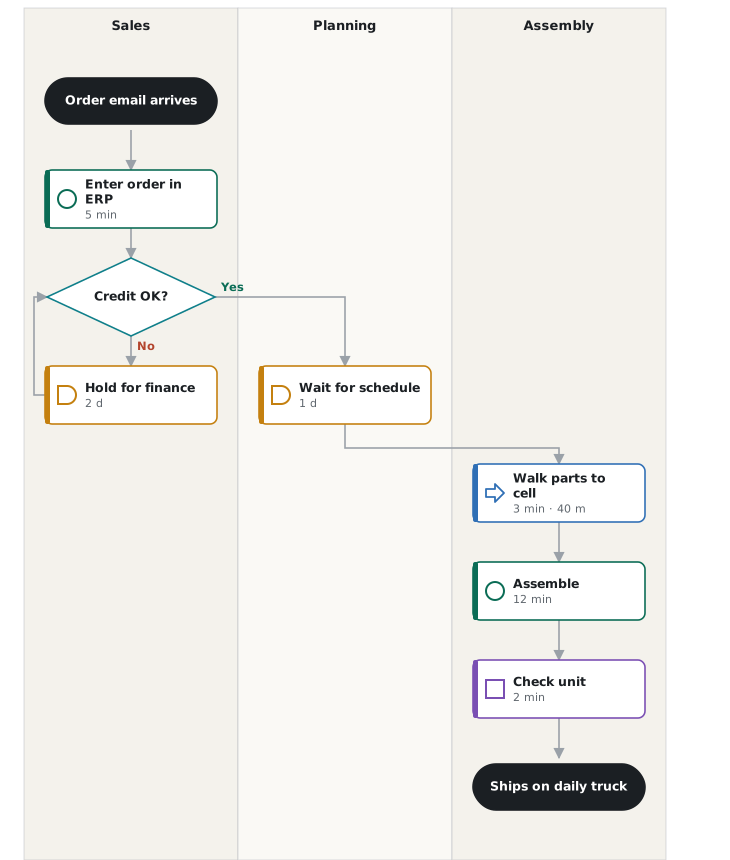
Yes. Turn on swimlanes and give each person or department a lane; every step goes in the lane of whoever does it, and the analysis counts the handoffs between lanes.
Yes. Open your map and choose Process flow, then Build it from this value stream map. Its steps, queues and quality data become operations, delays and Yes/No checks with their times.
Yes: the chart as PNG or SVG, the flow process chart as a CSV file for Excel, or print the chart and the table together as a PDF.
Start with a few questions, your value stream map or a description. The layout and the analysis are done for you.