
 VSM Studio
VSM guide / Template
Free value stream map template
A ready-made value stream map layout you can edit online: supplier, production control, customer, four process boxes, inventory triangles, push and information arrows, and the lead-time ladder. Type in your numbers and the template calculates takt time, lead time, processing time and PCE for you.
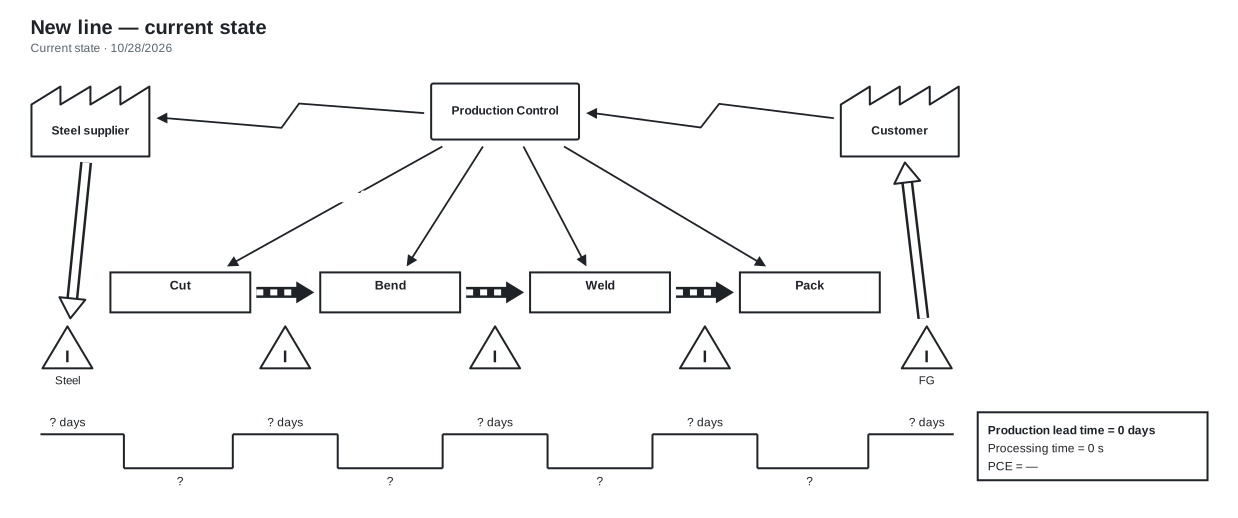
What to fill in
Customer and time
- Demand per month and working days
- Shifts, shift length and breaks
These give takt time, shown in the yellow box under the customer. Not sure? Use the takt time calculator.
Each process box
- Cycle time (C/T), changeover (C/O)
- Uptime, operators, scrap
A box turns orange or red when the step runs close to or over its capacity.
Each inventory triangle
- The count of parts waiting in front of the step
The template converts counts into days of demand and builds the lead-time ladder from them.
Supplier and information flow
- How often material arrives
- How orders and schedules travel
Use the symbol guide for the arrow types.
Rather be guided?
Pick Build it step by step on the builder's start screen. It asks one question at a time (product, demand, steps, inventory, flows), draws the map as you answer, then walks you through finding problems, designing the future state and planning the work.
Questions
Is the template really free?
Yes. The builder and template are free, with maps saved in your browser. A free account keeps three maps in the cloud; Pro adds unlimited maps and simulations.
Can I export the map to PowerPoint or PDF?
Export a PNG or SVG for slides, or print an A3 page with the map, the summary numbers and your title block. Save & share has all the options.
Is there an Excel version?
You can import your steps from a CSV or ERP export, and the template draws the map from them. A sample CSV is available in the import dialog.